Back to Projects
AI Product Design & UX Workflow
Loom AI
Contribution
Interaction flow redesign / UI / Usability testing
Timeline
3 weeks
Platform
Web-Based AI Product
Loom AI is an AI-assisted content creation tool that helps users turn one idea into polished content across different channels and formats.
In this project, I redesigned the AI-guided drafting experience to make content generation more intuitive, structured, and aligned with the product’s AI-assisted concept.
Loom AI is an AI-assisted content creation tool that helps users turn one idea into polished content across different channels and formats.
In this project, I redesigned the AI-guided drafting experience to make content generation more intuitive, structured, and aligned with the product’s AI-assisted concept.
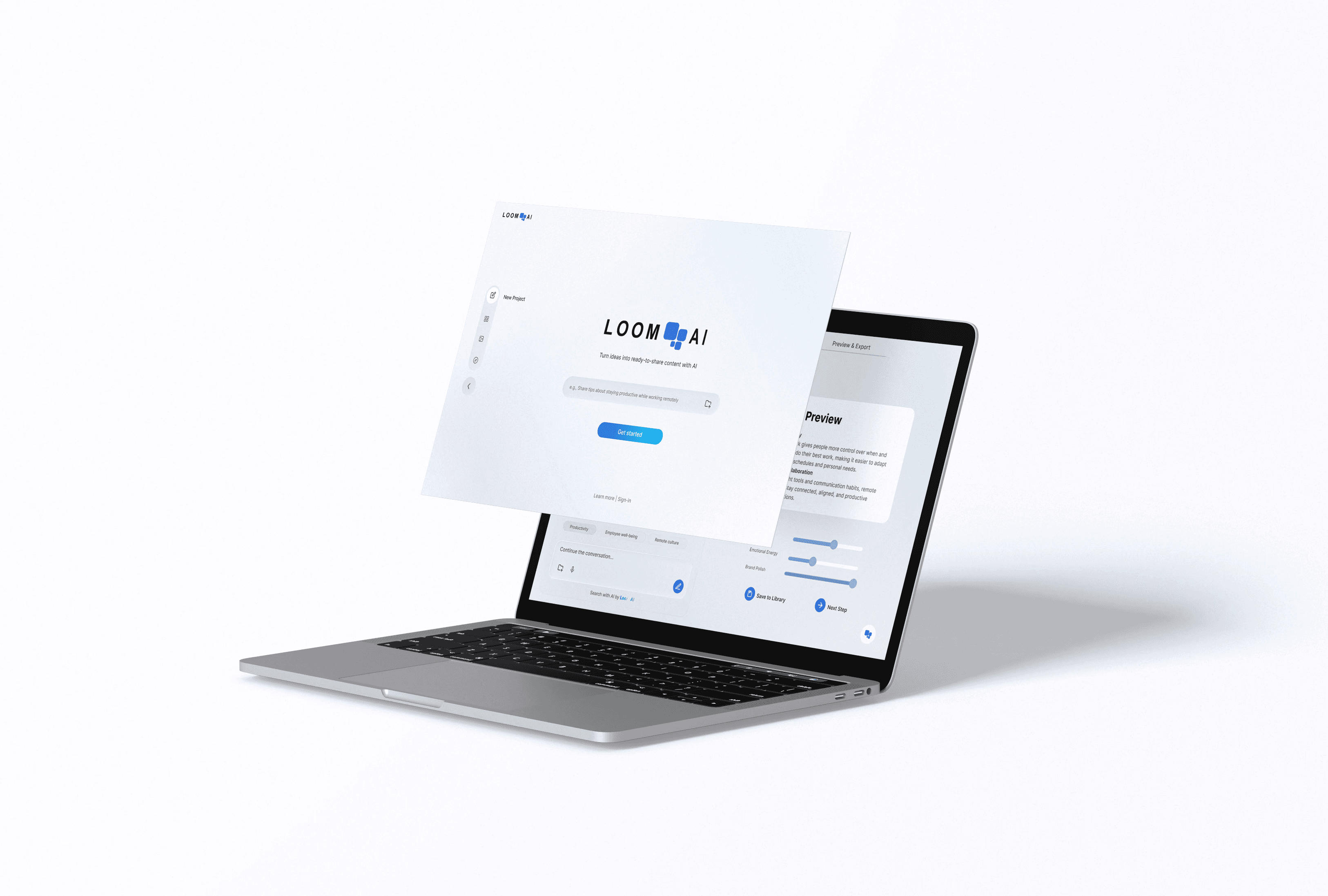
Product content
Product content
Product content
Loom AI helps users move from an initial idea to publish-ready content through a guided workflow.
Instead of repeatedly rewriting the same idea for different contexts, users can generate and refine content with AI support, then adapt it for different channels.
Loom AI helps users move from an initial idea to publish-ready content through a guided workflow.
Instead of repeatedly rewriting the same idea for different contexts, users can generate and refine content with AI support, then adapt it for different channels.
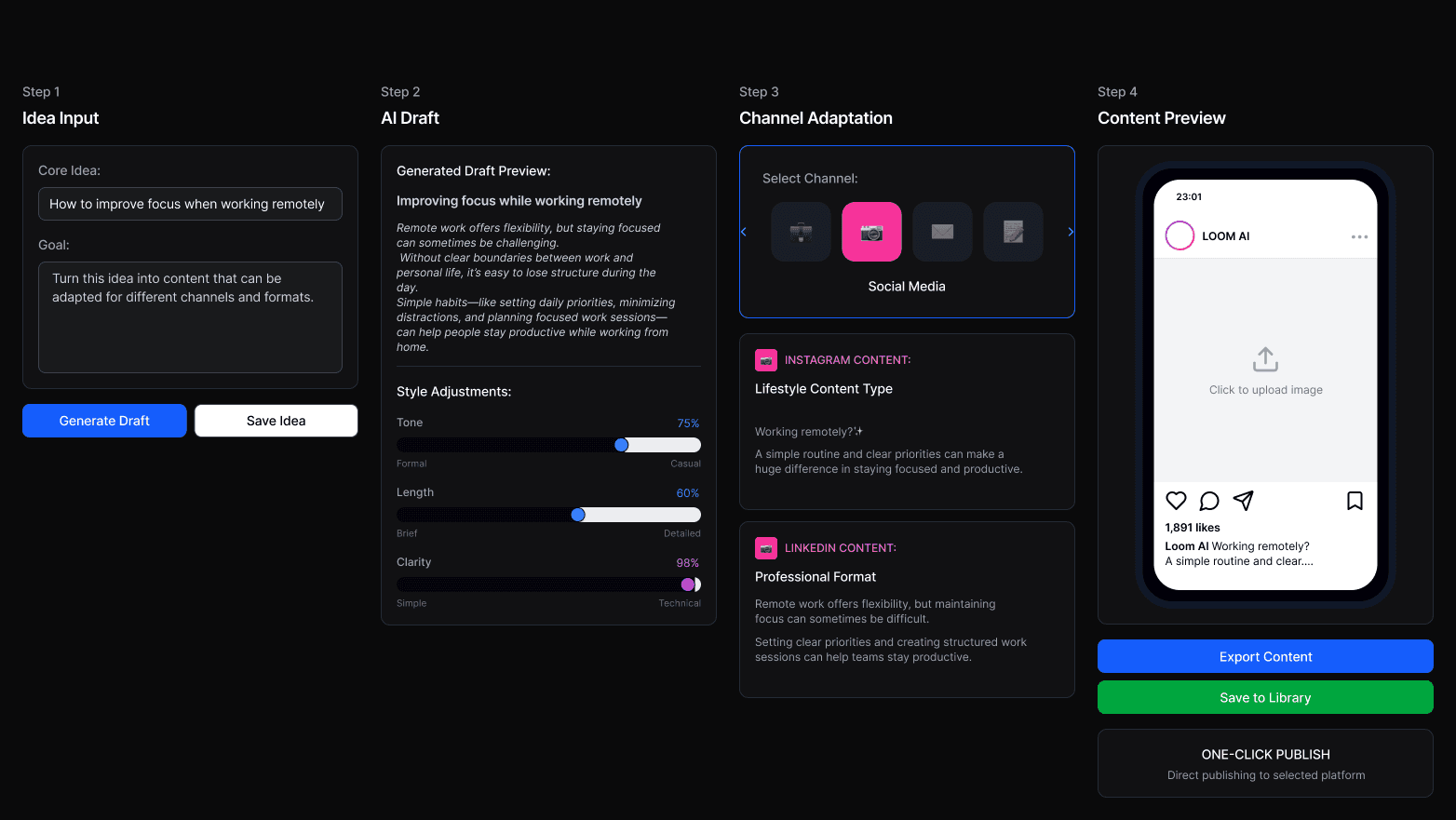
Idea Input
Idea Input
Start with a rough idea, message, or topic
Start with a rough idea, message, or topic
Tone & Style Control
Tone & Style Control
Generate structured drafts and refine tone or direction with AI assistance
Generate structured drafts and refine tone or direction with AI assistance
Channel Adaptation
Channel Adaptation
Adapt the content for different publishing channels or formats
Adapt the content for different publishing channels or formats
Preview & Finalize
Preview & Finalize
Review the generated output before exporting or publishing
Review the generated output before exporting or publishing
The Problem
The Problem
The original interface presented users with a dashboard-like layout that was visually crowded and cognitively overwhelming.
The issue that I took responsibility of became clear during internal walkthroughs and early product reviews.
The original interface presented users with a dashboard-like layout that was visually crowded and cognitively overwhelming.
The issue that I took responsibility of became clear during internal walkthroughs and early product reviews.
The experience did not feel AI-assisted
The experience did not feel AI-assisted
the experience did not fully reflect the product’s intended concept, and users were less likely to feel that AI was actively helping them generate content. This weakened both trust in the output and the overall perception of the product as a professional AI experience.
the experience did not fully reflect the product’s intended concept, and users were less likely to feel that AI was actively helping them generate content. This weakened both trust in the output and the overall perception of the product as a professional AI experience.
Design Scope
Design Scope
This redesign focused specifically on the problem that I stated. My role was to:
This redesign focused specifically on the problem that I stated. My role was to:
Redesign the interaction flow to create a more guided experience
Design the UI for the new flow across the revised workflow screens
Redesign the interaction flow to create a more guided experience
Design the UI for the new flow across the revised workflow screens
Key Use Cases
Key Use Cases
Content Creators
Turn one idea into an Instagram caption, a LinkedIn post, or a blog intro
Turn one idea into an Instagram caption, a LinkedIn post, or a blog intro
Small Teams
Adapt one update for email, social media, and team communication
Adapt one update for email, social media, and team communication
Professionals
Reshape one message into a presentation intro, an email summary, or a public post
Reshape one message into a presentation intro, an email summary, or a public post
Across these different use cases, users shared four common needs: a workflow that feels efficient, intuitive, guided, and flexible. These needs became key considerations in the redesign.
Across these different use cases, users shared four common needs: a workflow that feels efficient, intuitive, guided, and flexible. These needs became key considerations in the redesign.
Early Exploration
Early Exploration
Based on insights from the earlier analysis and internal discussions, I quickly explored a new direction for the experience within two days.
Based on insights from the earlier analysis and internal discussions, I quickly explored a new direction for the experience within two days.
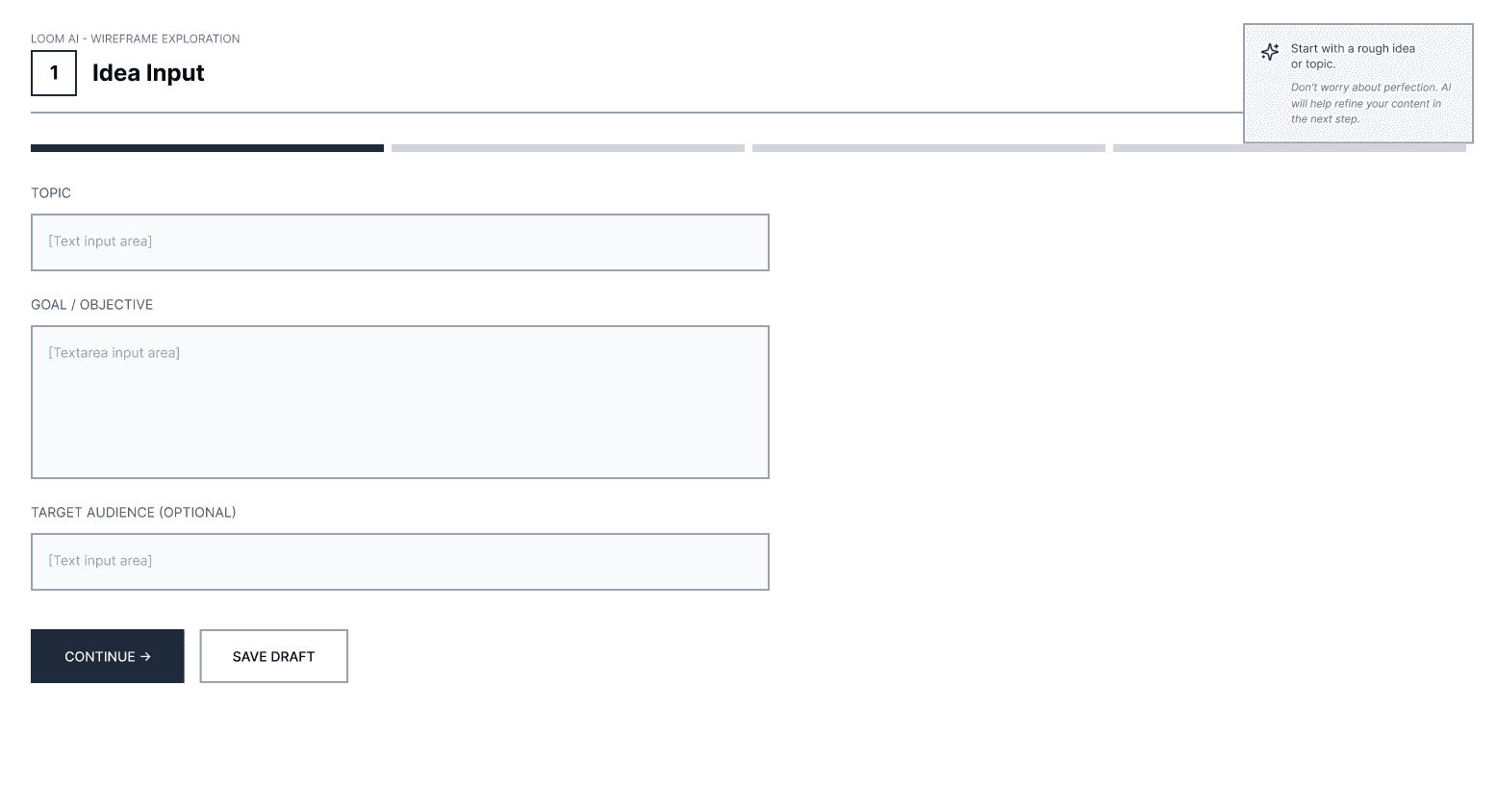
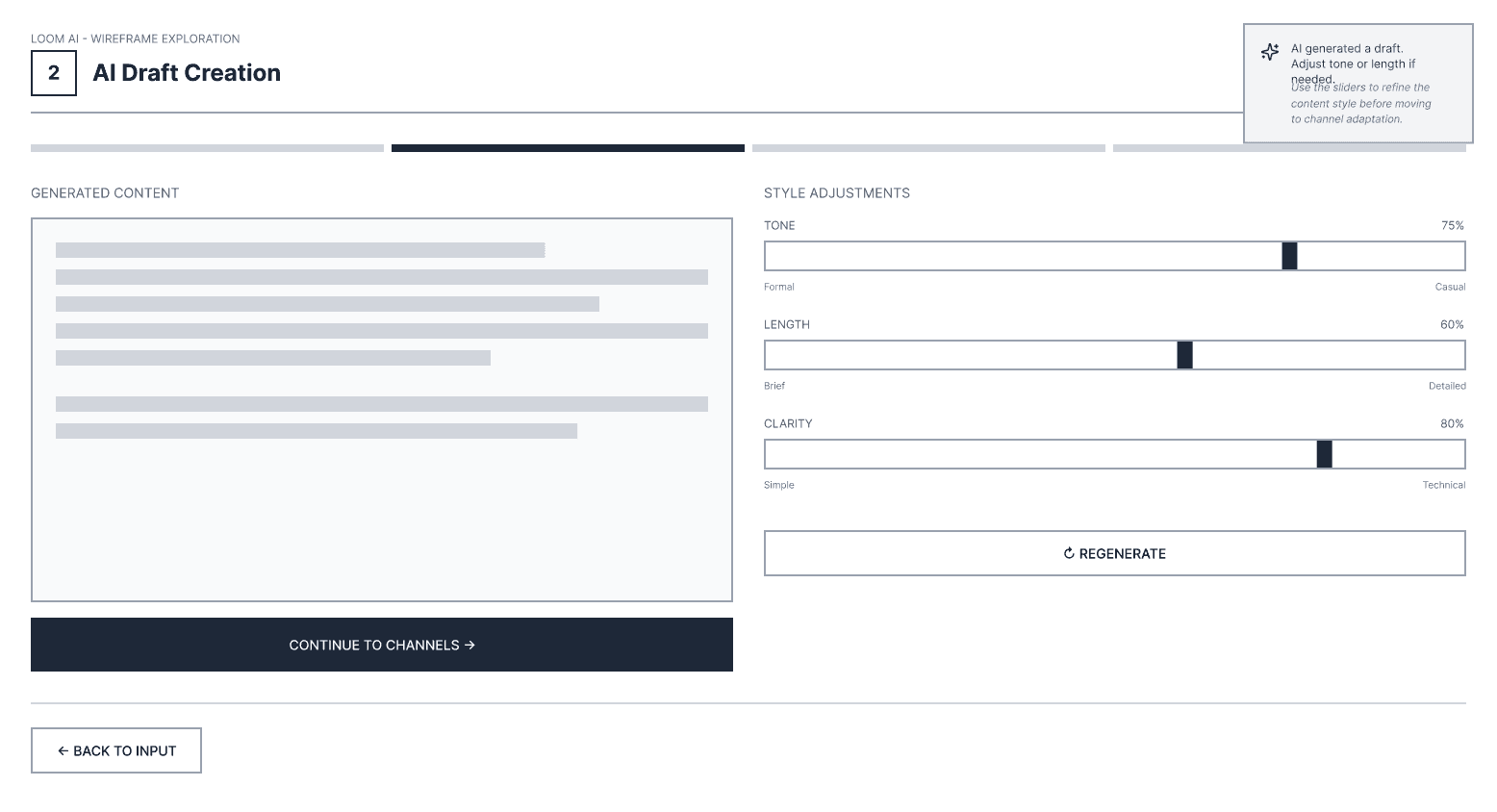
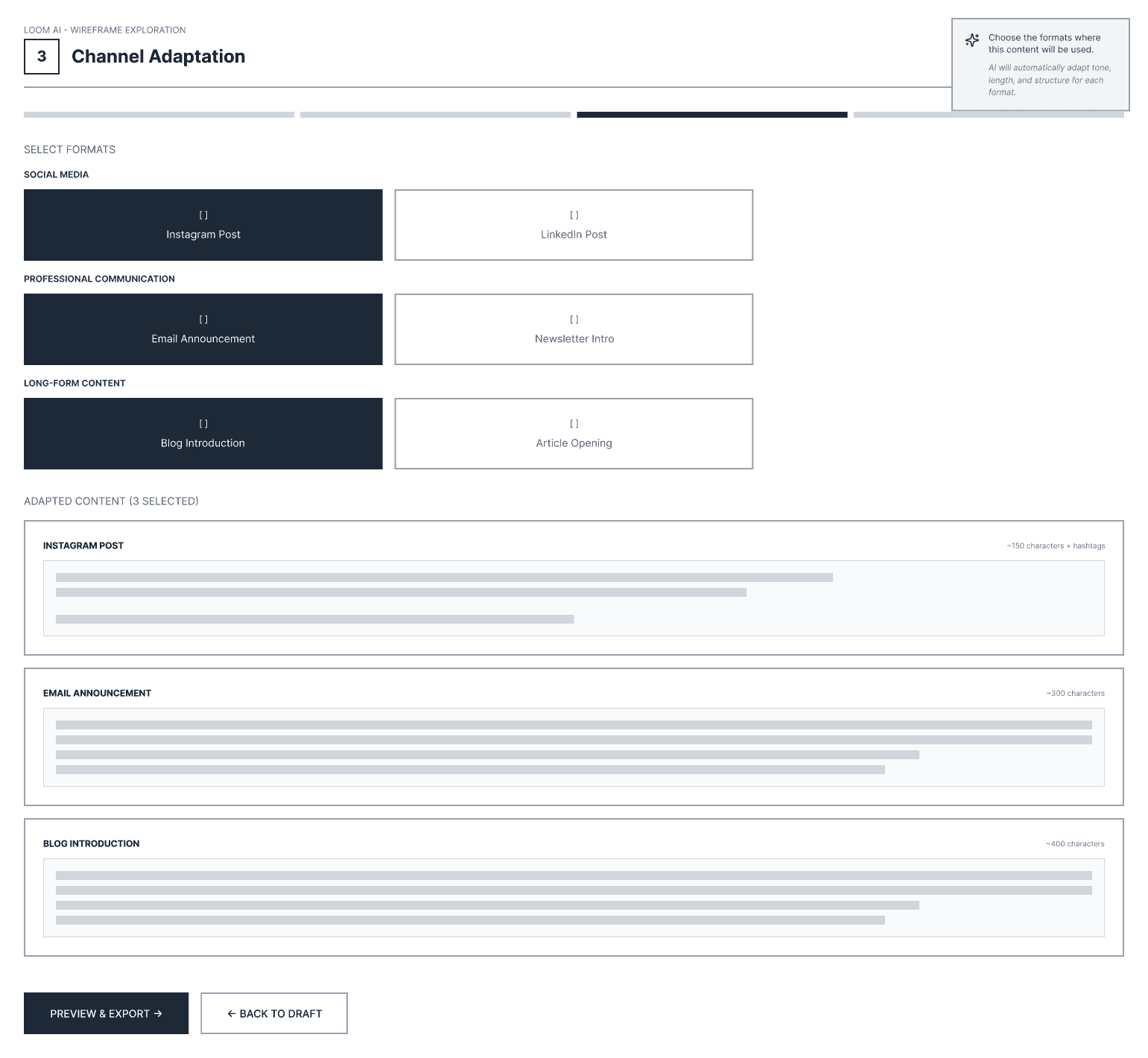
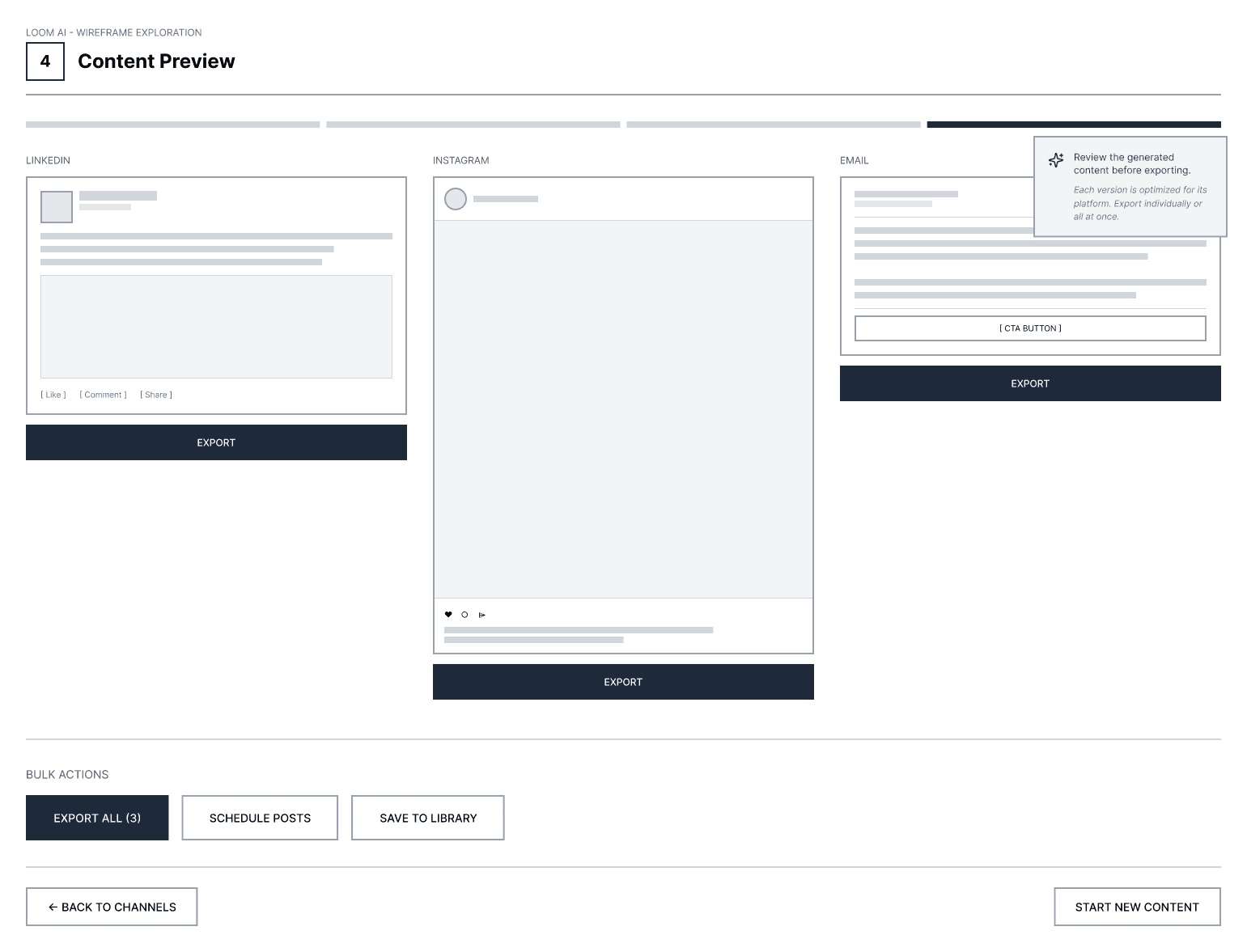
Separated the original four-step process into individual pages
Separated the original four-step process into individual pages
Added a lightweight AI guide in the top-right corner of each screen
Added a lightweight AI guide in the top-right corner of each screen
Design Iteration 1
Design Iteration 1

After the early exploration, I aligned with the product team on moving forward with a page-by-page workflow. This direction made the process easier to follow and reduced the crowded feeling of the original interface.
After the early exploration, I aligned with the product team on moving forward with a page-by-page workflow. This direction made the process easier to follow and reduced the crowded feeling of the original interface.

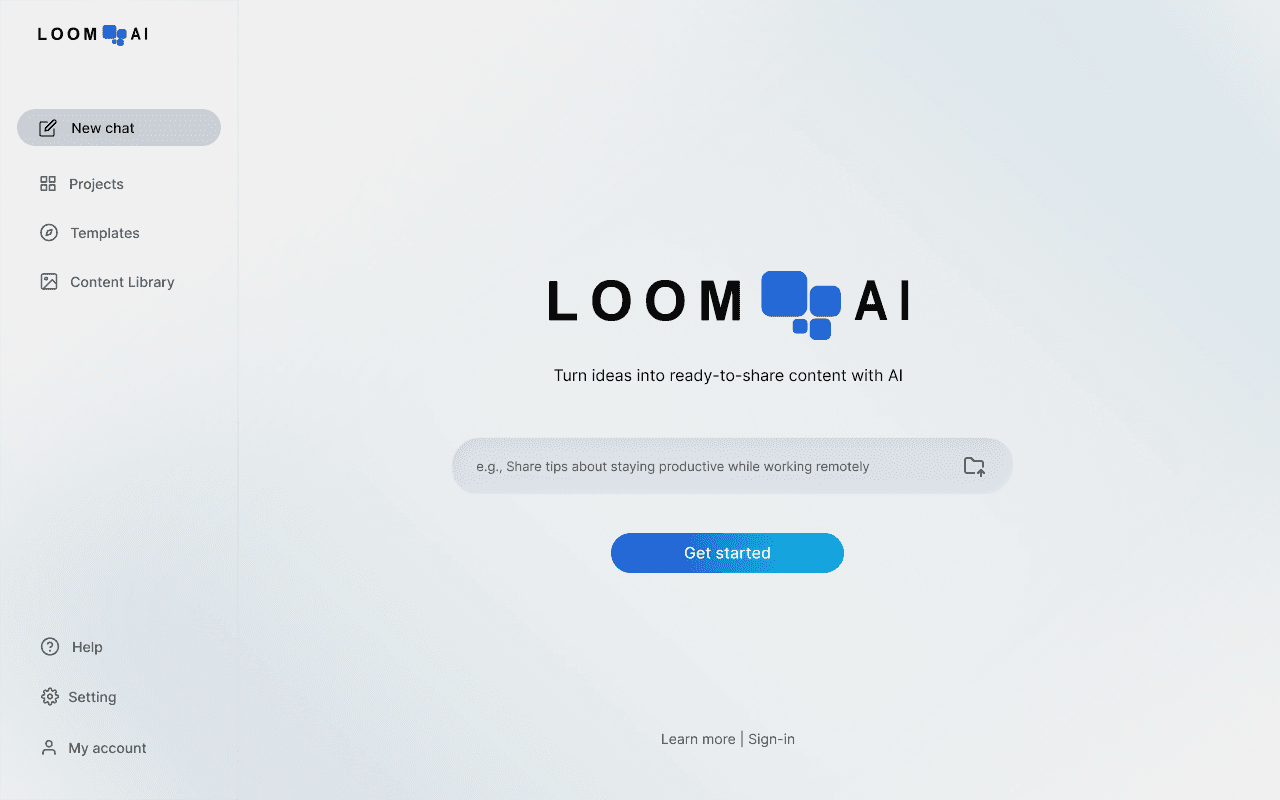
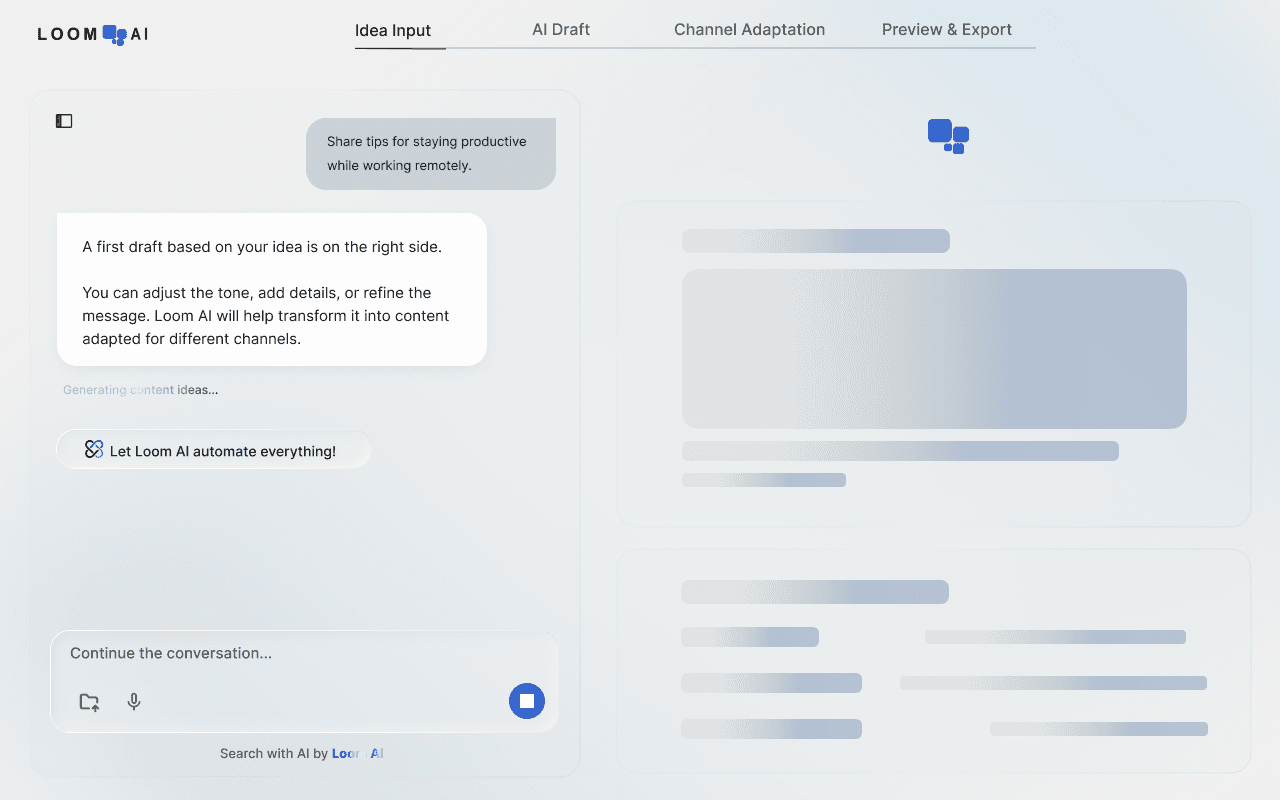
This iteration focused on improving the clarity of the AI guidance. To achieve this, I transformed the first two steps into a chat-based format. As a result, the product began to feel less like a feature dashboard and more like a guided AI workflow.
This iteration focused on improving the clarity of the AI guidance. To achieve this, I transformed the first two steps into a chat-based format. As a result, the product began to feel less like a feature dashboard and more like a guided AI workflow.
*This iteration also reflects several smaller feature requests raised during discussions with the product team.
*This iteration also reflects several smaller feature requests raised during discussions with the product team.
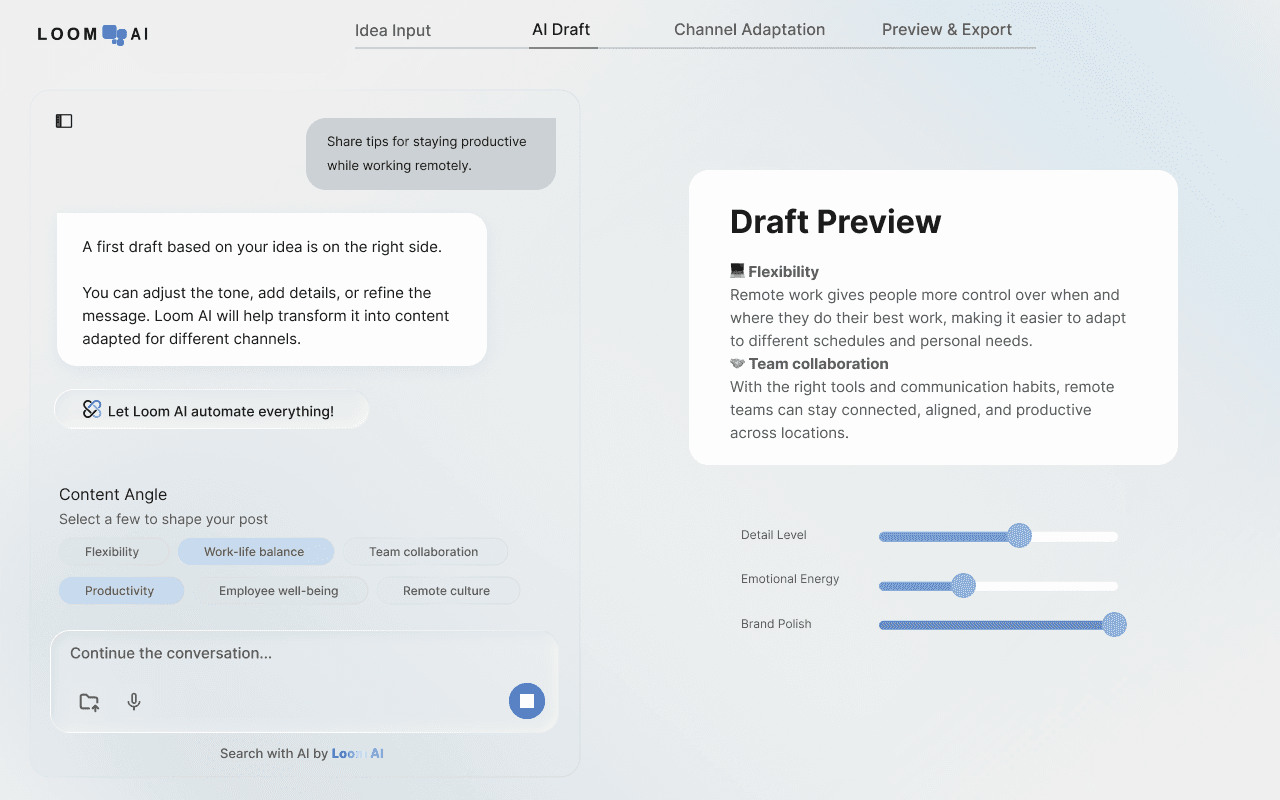
Key Changes
Key Changes
Making AI Guidance More Visible
Making AI Guidance More Visible
Turned the first two steps into an AI chat-based flow
Turned the first two steps into an AI chat-based flow
Intuitive
Intuitive
Guided
Guided
Started the interaction with chat directly from the home page
Started the interaction with chat directly from the home page
Intuitive
Intuitive
Added a “Let Loom AI do everything” option within chat which allows users choose a fully automated path, skip manual adjustments, and jump directly to a generated preview
Added a “Let Loom AI do everything” option within chat which allows users choose a fully automated path, skip manual adjustments, and jump directly to a generated preview
Efficient
Efficient
Flexbility
Flexbility
Separated chat and generated content into two columns
Separated chat and generated content into two columns
Guided
Guided
Added a one-click tailor option during tone adjustment
Added a one-click tailor option during tone adjustment
Efficient
Efficient
Usability Testing
Usability Testing
We tested the iteration 1 concept with 6 participants.
We tested the iteration 1 concept with 6 participants.

Testing Goals
Testing Goals
See if users could recognize Loom AI’s guidance throughout the content creation process
Evaluate whether the split layout between chat and generated content felt clear and understandable
Understand whether users noticed or how users use the “Let Loom AI do everything” option and one-click tailoring feature
See if users could recognize Loom AI’s guidance throughout the content creation process
Evaluate whether the split layout between chat and generated content felt clear and understandable
Understand whether users noticed or how users use the “Let Loom AI do everything” option and one-click tailoring feature

Key Findings
Key Findings
2/6 participants were curious about the left-side navigation on the first screen and wanted to explore it before moving on
4/6 participants clicked “Let Loom AI do everything” to see what the feature did
In the tone refinement step, 5/6 participants tried Tailor before using Adjust
2/6 participants were curious about the left-side navigation on the first screen and wanted to explore it before moving on
4/6 participants clicked “Let Loom AI do everything” to see what the feature did
In the tone refinement step, 5/6 participants tried Tailor before using Adjust
2/6 participants were curious about the left-side navigation on the first screen and wanted to explore it before moving on
4/6 participants clicked “Let Loom AI do everything” to see what the feature did
In the tone refinement step, 5/6 participants tried Tailor before using Adjust
Insight 1
Insight 1
The left-side navigation competed with the main flow, and the home page did not communicate clearly enough what the product was for or how users should begin.
The left-side navigation competed with the main flow, and the home page did not communicate clearly enough what the product was for or how users should begin.
Insight 2
Insight 2
Once users entered the guided flow, they were generally able to follow it smoothly
Once users entered the guided flow, they were generally able to follow it smoothly
Insight 3
Insight 3
The “Let Loom AI do everything” option was too prominent and not clearly explained, which often led users to select it before understanding the rest of the experience
The “Let Loom AI do everything” option was too prominent and not clearly explained, which often led users to select it before understanding the rest of the experience
Insight 4
Insight 4
The Tailor feature showed a similar attraction pattern, but users viewed it more positively as a useful shortcut during tone refinement
The Tailor feature showed a similar attraction pattern, but users viewed it more positively as a useful shortcut during tone refinement
Design Iteration 2
Design Iteration 2

Iteration 2 focused on responding to the main issues uncovered during usability testing. The redesign clarified how users should begin, reduced elements that competed with the main flow, and adjusted shortcut features that were drawing users away from the intended step-by-step experience.
Iteration 2 focused on responding to the main issues uncovered during usability testing. The redesign clarified how users should begin, reduced elements that competed with the main flow, and adjusted shortcut features that were drawing users away from the intended step-by-step experience.
Key Changes
Key Changes
Clarifying the Entry Point
Clarifying the Entry Point
Simplified the navigation section on the home page
Refined the central product introduction to make the purpose and starting point clearer
Simplified the navigation section on the home page
Refined the central product introduction to make the purpose and starting point clearer
Rebalancing Automation and Control
Rebalancing Automation and Control
Replace the “ Let Loom AI do everything”
Clarified the shortcut’s function before activation
Replace the “ Let Loom AI do everything”
Clarified the shortcut’s function before activation
Usability Testing 2
Usability Testing 2
Based on the second usability testing and follow-up discussions with the team, we identified two areas that needed further refinement.
Based on the second usability testing and follow-up discussions with the team, we identified two areas that needed further refinement.
The first two steps were not clearly differentiated
The first two steps were not clearly differentiated
Although they were labeled as separate steps in the top navigation, the interaction between them was not distinct enough, which created confusion in the flow.
Although they were labeled as separate steps in the top navigation, the interaction between them was not distinct enough, which created confusion in the flow.
The next action after Adjust was not visible enough
The next action after Adjust was not visible enough
Once users completed the Adjust step, there was no clear call to action leading them into channel selection.
Once users completed the Adjust step, there was no clear call to action leading them into channel selection.
Next Step:
Next Step:
Combined the first two steps into one stage
This reduced unnecessary separation in the flow and made the overall process easier to follow.
Added a “Next Step” button after task completion
Users could continue through the flow directly, without needing to rely on the top navigation to understand what to do next.
Combined the first two steps into one stage
This reduced unnecessary separation in the flow and made the overall process easier to follow.
Added a “Next Step” button after task completion
Users could continue through the flow directly, without needing to rely on the top navigation to understand what to do next.
Final Design Prototype
Final Design Prototype
The final design combines the main improvements from earlier iterations into a clearer and more cohesive AI-guided experience.
The final design combines the main improvements from earlier iterations into a clearer and more cohesive AI-guided experience.
Key Interaction Patterns
Key Interaction Patterns
A Clear sense of AI guidance
A Clear sense of AI guidance
The final design makes AI support more visible from the very beginning, so users can more easily understand that the system is there to guide the process rather than simply present a set of tools.
The final design makes AI support more visible from the very beginning, so users can more easily understand that the system is there to guide the process rather than simply present a set of tools.
A more connected creation flow
A more connected creation flow
The process feels less fragmented and more like a connected AI-assisted workflow.
The process feels less fragmented and more like a connected AI-assisted workflow.
A better balance between automation and user control
A better balance between automation and user control
The final experience keeps AI shortcuts available, but positions them in a way that supports user choice rather than overriding it. This makes the AI feel helpful and collaborative instead of overly dominant.
The final experience keeps AI shortcuts available, but positions them in a way that supports user choice rather than overriding it. This makes the AI feel helpful and collaborative instead of overly dominant.
Impact & Results
↑
42%
Increase in task completion rate during our interior testing
↓
65%
Reduction in time-to-first-output
⭐
4.7
User satisfaction score (out of 5)
Reflection
Reflection
This project reinforced the importance of workflow design in AI products and revealed key insights about user expectations.
This project reinforced the importance of workflow design in AI products and revealed key insights about user expectations.
Key Learnings
Key Learnings
Good AI UX is also about balancing control
Good AI UX is also about balancing control
Working on this project made me more aware that automation alone does not necessarily create a better experience. Users may respond more positively when AI support feels efficient, but still leaves room for choice and adjustment.
Working on this project made me more aware that automation alone does not necessarily create a better experience. Users may respond more positively when AI support feels efficient, but still leaves room for choice and adjustment.
AI products rely on flow as much as features
AI products rely on flow as much as features
In AI products, a clearer flow may make intelligent features feel more understandable, supportive, and trustworthy.
In AI products, a clearer flow may make intelligent features feel more understandable, supportive, and trustworthy.
Good collaboration depends on communication that fits the audience
Good collaboration depends on communication that fits the audience
Working with different teams showed me that the same design idea often needs to be framed differently depending on who I am speaking to, so that the discussion stays clear, productive, and aligned.
Working with different teams showed me that the same design idea often needs to be framed differently depending on who I am speaking to, so that the discussion stays clear, productive, and aligned.
Portfolio
Home
Work
Process
Learn
About
Resume
Blog
Legal
Privacy
Terms
2026